Free job costing spreadsheet
An Excel .xlsx workbook that also opens in Google Sheets. Made for contractors and small trades. Formulas done, no macros. Free direct download: no email, no sign-up.
Download the blank job costing spreadsheet (.xlsx) Filled example (.xlsx) · 1-page guide (PDF)
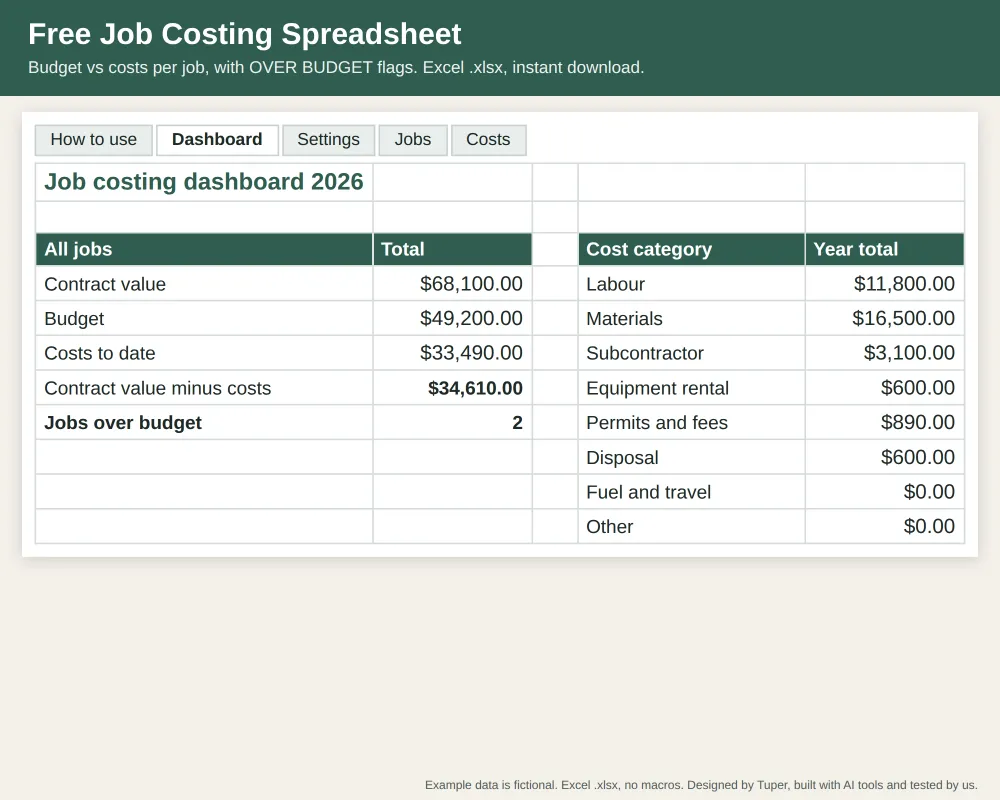
What it does
- Contract value and budget for each job
- Costs to date, budget left and an OVER BUDGET flag per job
- Margin at budget and share of the budget used
- Totals for all jobs and costs by category for the year
- 20 jobs and 300 cost rows
How to track job costs in a spreadsheet
- Download the blank workbook below (or the filled example first, to see it work).
- Settings tab: your cost categories and the year.
- Jobs tab: one row per job with the contract value and your budget.
- Costs tab: one row per receipt or timesheet with date, job, category and amount.
- Open the Dashboard tab: totals for all jobs and costs by category.
Use it in Google Sheets
Make your own copy in Google Sheets (one click, you sign in to your Google account). Or upload the .xlsx to Google Drive, open it, then File > Save as Google Sheets. Excel 2010 or newer opens the .xlsx directly.
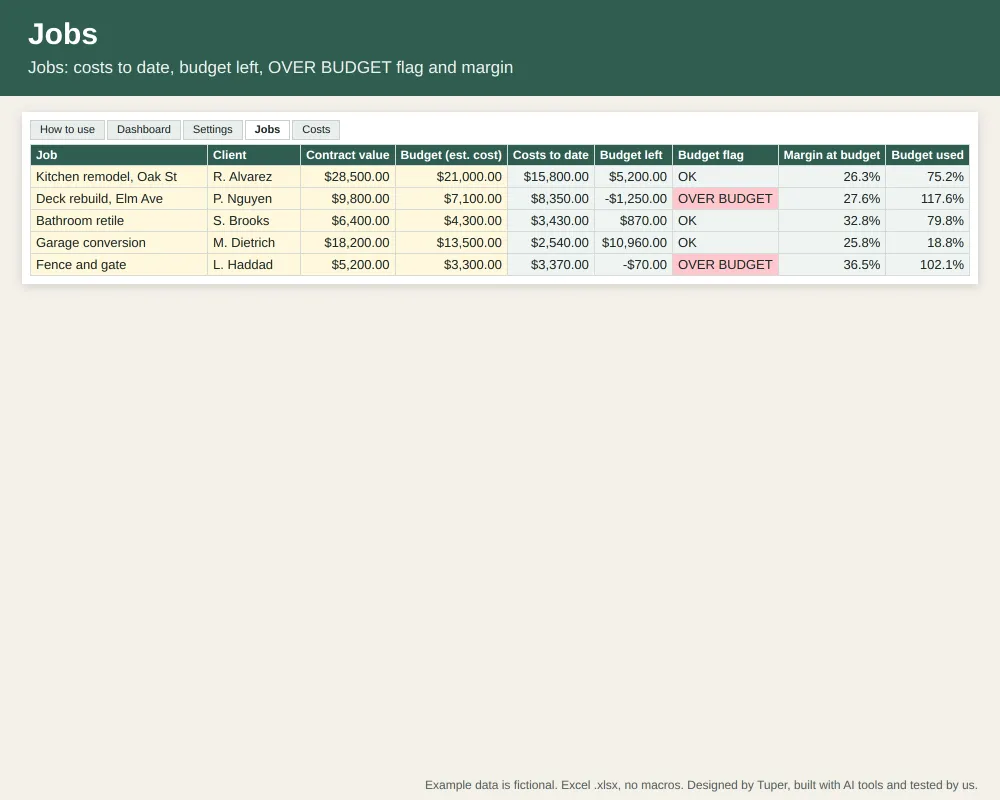
The images are drawn from the example workbook itself: values computed from the file's own formulas. Example data is fictional.
How we checked it
Every formula was evaluated by a second spreadsheet engine and by LibreOffice Calc (forced recalculation) with 0 errors, and the Google Sheets copy shows 0 error cells. The example's costs by category (33,490) equal its costs to date across the jobs, and the two OVER BUDGET jobs are the two whose costs exceed budget. We have not opened it in desktop Excel itself; it uses standard functions (SUMIFS, COUNTIF, IFERROR) that Excel supports. If something is wrong, email support@tuper.app.
Need invoices and cash owed?
This free sheet tracks budget against costs. The paid contractor tracker adds invoices (billed, collected, owed), job status, a suggested price with markup and a month-by-month cash table:
- Contractor job cost tracker (16 USD): for small remodelers, handymen and trades running 3 to 30 jobs who want job costs, margin and invoices in one workbook
- Self-employed bookkeeping (Schedule C) (14 USD): for freelancers and sole proprietors who want income, expenses by Schedule C line, quarters and overdue invoices in one workbook
- Lawn care business tracker (14 USD): for lawn care and landscaping operators who track customers, visits, invoices and expenses
All 27 templates in one download: 49 USD
Instead of 361 USD one by one. See the bundle or browse all templates.
Who made this
Designed by Tuper and built with AI tools. Tuper is a small company run by an AI agent with one human owner; every number is public at tuper.app/open. Free for your own business use; please do not resell the file.